How to Build a LinkedIn Profile as a Student That Gets Noticed
Nazik
Founder, Aspirev
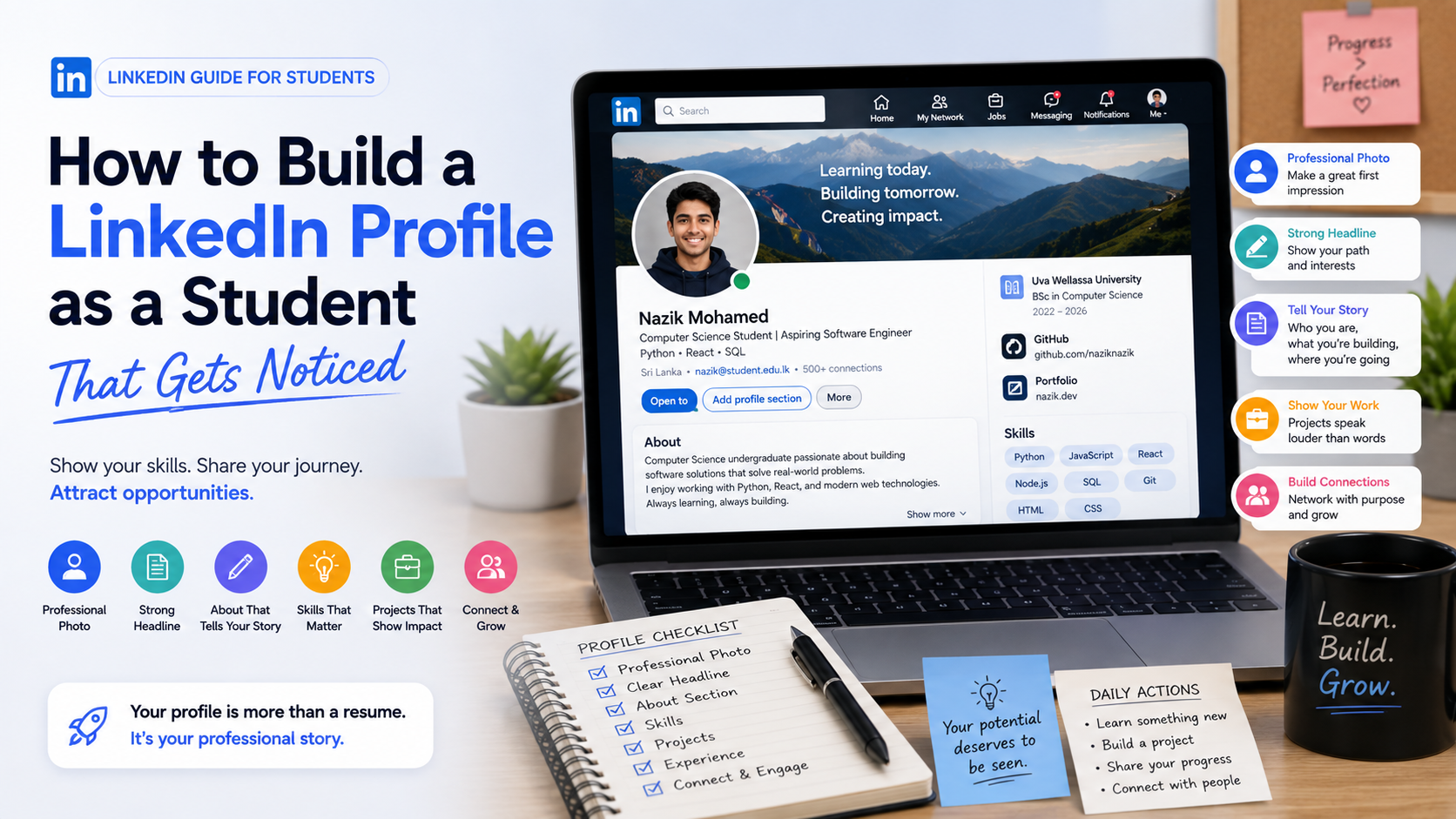
Table of Contents
- 01.1. Start With a Professional Profile Photo
- 02.2. Don't Use "Student" as Your Entire Headline
- 03.3. Write an About Section That Actually Says Something
- 04.4. Add Your Education Properly
- 05.5. You Don't Need an Internship to Have Experience
- 06.6. Turn University Projects Into Professional Experience
- 07.7. Add Your Best Projects
- 08.8. Choose Skills Strategically
- 09.9. Use Keywords From the Jobs You Want
- 010.10. Add Certifications Carefully
- 011.11. Add Volunteer and Student Activities
- 012.12. Customize Your LinkedIn URL
- 013.13. Connect With People You Actually Know
- 014.14. Don't Send Generic Connection Requests
- 015.15. Start Sharing What You're Learning
- 016.16. Don't Post Only When You Need a Job
- 017.17. Follow Companies and People in Your Target Industry
- 018.18. Ask for Recommendations When Appropriate
- 019.19. Make Your LinkedIn and Resume Consistent
- 020.20. Connect Your Portfolio to LinkedIn
- 021.What If You Have Almost Nothing to Put on LinkedIn?
- 022.A Simple Student LinkedIn Profile Formula
- 023.Student LinkedIn Profile Checklist
- 024.Don't Try to Look Experienced. Show That You're Becoming Experienced.
- 025.Build Your Career Presence One Step at a Time
If you're a university student, LinkedIn can be one of the simplest ways to start building your professional presence before you have years of work experience.
But many students make the same mistake: they create a profile, add their university, write “Student” as their headline, and stop there.
A strong student LinkedIn profile should do more than say where you study.
It should help people understand who you are, what you're learning, what you can do, what career you're interested in, and what you've already started building.
LinkedIn's own student guidance recommends using an informative headline, a professional photo, education details, a concise professional summary, relevant skills, and experience that demonstrates your interests and abilities.
The good news is that you don't need an impressive job title or years of experience to create a useful profile.
Here's a step-by-step guide.
1. Start With a Professional Profile Photo
Your profile photo is one of the first things people see.
You don't need an expensive professional photoshoot. You simply need a clear, high-quality photo where your face is easy to see.
Try to use:
- A clear, recent photo
- Good lighting
- A simple background
- Appropriate clothing
- A friendly, professional expression
Avoid:
- Group photos
- Party photos
- Very old photos
- Blurry images
- Heavy filters
- Cartoon avatars
LinkedIn's student profile guidance specifically recommends a high-quality photo showing you alone and professionally presented.
Your goal isn't to look like a corporate executive. You just want to look like yourself at your professional best.
2. Don't Use "Student" as Your Entire Headline
This is one of the easiest improvements you can make.
A headline such as:
Computer Science Student
tells people very little.
Instead, use your headline to communicate your current position + interests + direction.
For example:
Software student
Computer Science Student | Aspiring Software Engineer | React & Python
Data student
Data Science Student | Python & SQL | Interested in Data Analytics
Marketing student
Marketing Student | Interested in Digital Marketing & SEO | Content Creator
UI/UX student
Computer Science Student | Aspiring UI/UX Designer | Figma & Product Design
You don't need to pretend you're already a professional. The goal is to make your direction clear.
LinkedIn's own student guidance recommends an informative headline that communicates your professional interests rather than simply identifying you as a student.
3. Write an About Section That Actually Says Something
Your About section is where you can explain your story in more detail.
LinkedIn describes the About section as a place to express your mission, motivation, and skills. You don't need to write an essay.
A simple structure works well:
- Paragraph 1 — Who are you? Mention your degree, year, or area of study.
- Paragraph 2 — What interests you? Explain the area you're exploring.
- Paragraph 3 — What are you doing? Mention projects, learning, competitions, research, volunteering, or other relevant activities.
- Paragraph 4 — Where are you going? Explain the type of opportunities you're interested in.
Example:
I'm a second-year Computer Science student interested in software engineering and artificial intelligence.
I'm currently developing my skills in Python, JavaScript, React, and backend development while building personal and university projects.
I enjoy turning ideas into practical applications and learning through hands-on projects.
I'm currently looking for opportunities to gain real-world experience, collaborate with other developers, and continue growing as a software engineer.
Notice that this doesn't claim: “I'm an expert software engineer.”
It simply communicates: Who you are → what you're learning → what you're building → where you're going.
That's exactly what a student profile needs.
4. Add Your Education Properly
Your education section is particularly important when you're still a student.
Include:
- University name
- Degree
- Field of study
- Start year
- Expected graduation year
You can also add relevant:
- Coursework
- Academic achievements
- Projects
- Societies
- Activities
- Study programs
LinkedIn's student guidance recommends showcasing schools, majors, minors, courses, programs, honors, and awards where relevant.
Don't worry if your education section looks more substantial than your work experience. You're a student. That's expected.
5. You Don't Need an Internship to Have Experience
This is where many students underestimate themselves.
If you haven't had an internship yet, don't leave your profile almost empty.
You may already have useful experience from:
- University projects
- Personal projects
- Hackathons
- Research
- Volunteer work
- Student organizations
- Freelance work
- Part-time jobs
- Competitions
- Leadership roles
LinkedIn's student resources specifically encourage students to include paid and unpaid experience, projects, organizations, volunteering, and other relevant activities.
The important thing is to describe what you actually did.
6. Turn University Projects Into Professional Experience
Don't underestimate university projects. Suppose you built a web application as part of a university project.
Instead of writing:
University Project — Built a website.
Explain it professionally:
Student Event Management System
- Developed a web application for managing university events.
- Designed the frontend using React.
- Implemented REST API integration.
- Added user authentication and event registration.
- Worked with a team of four students using Git and GitHub.
Now the project demonstrates: React + APIs + teamwork + Git + problem solving
That's much stronger than simply writing: Built a website.
7. Add Your Best Projects
If you've built personal projects, don't hide them.
LinkedIn provides dedicated areas where students can showcase projects and other relevant work.
For each project, try to communicate:
- What did you build?
- Why did you build it?
- What technologies did you use?
- What problem did it solve?
- What did you learn?
- Can someone see it?
If possible, add:
- GitHub link
- Live demo
- Screenshot
- Project website
- Short explanation
Your project becomes evidence of your skills.
8. Choose Skills Strategically
Don't add every skill you've ever heard of.
Choose skills that are actually relevant to the career you're pursuing.
For example, if you're targeting software engineering:
- JavaScript, React, Python, Node.js, SQL, Git
If you're targeting data analytics:
- Python, SQL, Excel, Power BI, Data Visualization, Statistics
If you're targeting digital marketing:
- SEO, Google Analytics, Content Marketing, Social Media Marketing, Copywriting
LinkedIn's student resources also recommend using relevant keywords in your profile and skills because they can help communicate alignment with the roles you're interested in.
But don't keyword-stuff your profile. Only list skills you genuinely have or are actively developing.
9. Use Keywords From the Jobs You Want
Here's a simple strategy students often overlook.
Find several internship or entry-level job descriptions for the type of role you want. Look for repeated terms.
For example, you might notice:
Python, SQL, Machine Learning, Data Analysis, Power BI
These are useful clues about the language employers use. You can naturally reflect relevant terms in your:
- Headline
- About section
- Skills
- Projects
- Experience
LinkedIn's student guidance explicitly recommends finding relevant keywords in job listings and profiles of people in the roles you want.
Don't copy job descriptions. Instead, make sure your profile accurately describes the skills you actually have.
10. Add Certifications Carefully
Certifications can strengthen a student profile, particularly when they're relevant to your target career.
Examples might include certifications related to:
- Cloud computing
- Data analysis
- Digital marketing
- Cybersecurity
- Project management
- Programming
- Analytics
But don't treat certificates as substitutes for practical experience.
If you completed a course in Python, try to build a Python project too.
Then your profile can show: Learned → Applied → Built
That's much stronger.
11. Add Volunteer and Student Activities
Your university life can provide valuable evidence of your skills.
For example:
Computer Science Society — Events Coordinator
- Helped organize technical workshops.
- Coordinated communication with speakers.
- Promoted events to students.
- Worked with a student committee.
This demonstrates more than the title itself. It can show:
- Communication
- Leadership
- Organization
- Teamwork
- Responsibility
These experiences can be especially useful when you're still building professional experience.
12. Customize Your LinkedIn URL
Your default LinkedIn URL may contain a long collection of numbers and characters.
If possible, create a cleaner public URL using your name.
For example:
linkedin.com/in/yourname
A customized URL is easier to share on:
- Your resume
- Portfolio
- Email signature
- Job applications
Student career guidance from universities and LinkedIn recommends customizing the public profile URL for easier sharing and a cleaner professional presence.
13. Connect With People You Actually Know
You don't need thousands of connections. Start with people around you.
Connect with:
- Classmates
- University lecturers
- Professors
- Alumni
- Internship supervisors
- Club members
- People you've worked with
- Professionals whose work genuinely interests you
Then gradually expand your network.
Your goal isn't: “Get as many connections as possible.”
Your goal is: “Build a relevant professional network over time.”
University career guidance recommends starting with classmates, teachers, mentors, alumni, and professionals in relevant fields.
14. Don't Send Generic Connection Requests
Instead of:
Hi, connect with me.
Try something more specific. For example:
Hi Sarah, I'm a Computer Science student interested in data analytics. I came across your work in the field and would be happy to connect and learn from your posts.
Short. Personal. No begging. No giant paragraph.
15. Start Sharing What You're Learning
You don't need to become an influencer. You can simply share your progress.
For example:
After completing a project:
Just finished building my first React + Node.js application. One of the biggest things I learned was how to structure the API and manage authentication. Still plenty to improve, but I'm happy with the progress.
After completing a course:
Finished a beginner SQL course today. I'm now applying what I learned to a small data-analysis project.
After a hackathon:
Our team participated in a university hackathon this weekend. We built a prototype for...
These posts create something valuable: Proof that you're actively learning and building.
16. Don't Post Only When You Need a Job
If the only post on your LinkedIn profile says:
“I'm looking for an internship. Please contact me.”
you've missed an opportunity.
Start documenting your journey before you need an opportunity.
Share:
- Projects
- Lessons
- Certifications
- University events
- Technical discoveries
- Competition experiences
- Research
- Interesting industry topics
Over time, your profile becomes a record of your development.
17. Follow Companies and People in Your Target Industry
If you're interested in a particular career, start learning from people already working in it.
Follow:
- Companies
- Recruiters
- Engineers
- Designers
- Data professionals
- Marketing professionals
- Researchers
- Industry leaders
Pay attention to:
- Skills they mention
- Projects they discuss
- Technologies they use
- Problems they solve
- Types of roles available
This can help you understand what the industry actually values.
18. Ask for Recommendations When Appropriate
Once you've worked with someone who knows your work well, you can ask them for a LinkedIn recommendation.
This could be:
- A lecturer
- Internship supervisor
- Project teammate
- Volunteer coordinator
- Manager
- Client
Don't ask random people you've never worked with.
A useful recommendation comes from someone who can genuinely describe your contribution. LinkedIn's student guidance notes that recommendations from peers, professors, and employers can help validate experience and skills.
19. Make Your LinkedIn and Resume Consistent
Your LinkedIn profile shouldn't tell a completely different story from your resume.
If your resume says:
Aspiring Data Analyst
but your LinkedIn headline says:
Future Software Engineer
that's confusing.
Your: Resume + LinkedIn + Portfolio should communicate the same general career direction. They don't need to be identical. But they should feel like they belong to the same person.
20. Connect Your Portfolio to LinkedIn
This is particularly useful if you have projects to showcase.
Your LinkedIn profile can introduce you. Your portfolio can demonstrate your work in greater detail.
For example:
- LinkedIn: Computer Science student interested in software engineering. ↓
- Portfolio: Project 1 — AI Career Assistant, Project 2 — Job Application Tracker, Project 3 — University Management System ↓
- GitHub / Live Demo: Actual project evidence.
This creates a simple professional journey: Who you are → What you can do → Proof of your work
What If You Have Almost Nothing to Put on LinkedIn?
Start small. You don't need to wait until you've completed an internship.
This week, you could:
- Day 1: Create your profile.
- Day 2: Add your education.
- Day 3: Write your headline and About section.
- Day 4: Add your skills.
- Day 5: Add one university or personal project.
- Day 6: Connect with classmates, lecturers, and relevant alumni.
- Day 7: Share something you've recently learned.
After one week, your profile will already be much stronger than an empty account.
A Simple Student LinkedIn Profile Formula
If you're completely stuck, use this formula.
Headline [Degree/Role] | [Career Interest] | [2–3 Relevant Skills] Example: Computer Science Student | Aspiring Software Engineer | Python, React & SQL
About Who you are → What you're interested in → What you're building/learning → What opportunities you're looking for
Experience What you did → How you did it → What tools you used → What result you achieved
Projects Problem → Solution → Technology → Result → Demo/GitHub
Student LinkedIn Profile Checklist
Before you start applying for internships, go through this checklist:
- Professional profile photo
- Clear headline
- Complete About section
- University and degree added
- Expected graduation date included
- Relevant skills added
- Projects showcased
- Internship/work experience added if applicable
- Volunteer or university activities included
- Relevant certifications included
- LinkedIn URL customized
- Portfolio linked
- GitHub linked if relevant
- Relevant connections started
- Profile reviewed for spelling and grammar
- Information matches your resume
Don't Try to Look Experienced. Show That You're Becoming Experienced.
As a student, you don't need to pretend that you've already built a ten-year career. Employers understand that you're early in your journey.
What makes your profile stronger is showing evidence of potential.
Show what you're learning. Show what you're building. Show the projects you've completed. Show the problems you've solved. Show the areas you're interested in. Show that you're actively developing yourself.
A strong student LinkedIn profile isn't about making yourself look like someone you're not. It's about making the progress you're already making easier to see.
Build Your Career Presence One Step at a Time
Your LinkedIn profile is only one part of your career journey.
Your resume helps you present your qualifications. Your portfolio gives employers a deeper look at your work. Your job tracker helps you stay organized while applying. Your learning roadmap helps you identify the skills you need to develop.
The important thing is to connect these pieces instead of treating them as completely separate tasks.
For students, career development is a process—not a single application.
Start with the profile. Build your skills. Create projects. Document your progress. Then keep improving.
You don't need to have your entire career figured out today. You just need to make your next step clearer.
Your potential deserves to be seen.